Pages

Sunday, May 30, 2010

Ubuntu: How to download a missing GPG key

Here is the tutorials for how to download and add the gpg authentication key in software sources. It is easy and simple way.

Just download and install from the following links

For 10.04

Launchpad-getkeys

For 9.10

Launchpad-getkeys


For execute the programme type the following in terminal

sudo launchpad-getkeys

Now the missing authentication keys are installed. For verify the key go to

System->administration->software source->authentication


From the above picture, all the keys are installed correctly.

Friday, May 28, 2010

Ubuntu: Installing K3B burning application

To day I try to write a cd via brasero burning application. But some bugs are shown in the screen.


Toc2cue and cdrdao are missing and ask install manually. Cdrdao is found in synaptic package manager and other toc2cue is not found in anywhere.

So I install K3B, found in ubuntu software centre.


Now go to Applications->Sound & video->K3B


The K3B is open source and free to use look like a commercial burning application.

Now copy from cd and create image then wirte to another cd is very easy and fast


Some other features of K3B

1.Ripping cd
2.Ripping dvd

Wednesday, May 26, 2010

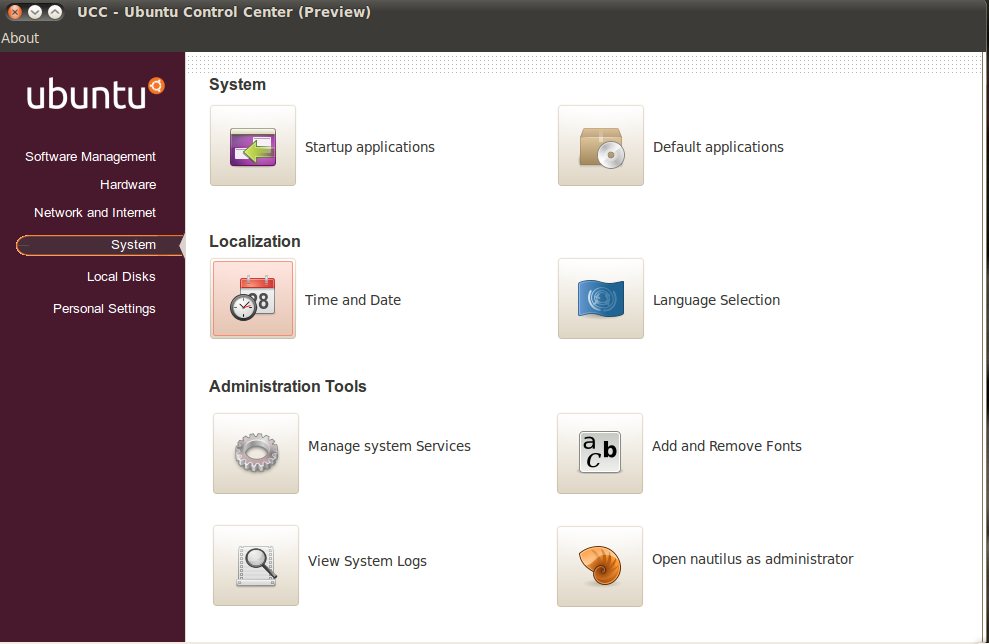
Ubuntu: UCC (ubuntu control centre) a administration tool

Ubuntu control centre (UCC) is a simple and centralised control centre for controlling all computer system. Control centre is a default ubuntu package in ubuntu. But this UCC is containing more third party programmes like font manager,hard info ,etc.,

First download the font manager and install it. Then download UCC and install the programme.

Now go to Applications->System Tools->ucc


Software Management


Hardware


Networks and internet


System


Local Disks


Personal Settings


Tuesday, May 25, 2010

Ubuntu: How to set up desktop wallpaper slideshow

Here tutorials for how to set up wallpaper slideshow.

Download the script and extrat here

Now right click on wallpaper, a nice slideshow in desktop is shown.


The press run button the following windown is open


Select picture folder, picture duration in minutes,sec,hrs and press ok


Monday, May 24, 2010

Ubuntu: How to install linuxmint main menu in ubuntu

Linux mint is a another linux operating system based on ubuntu. Now here tutorial for how to install linuxmint main menu in ubuntu.

First, add the following PPA in software source.

Type the following in the terminal.

sudo add-apt-repository ppa:webupd8team/mintmenu && sudo apt-get update

Then

sudo apt-get install mintmenu

The linuxmint maint menu is installed. The right click on top panel select 'Add to panel'->search and select mintmenu


Now in top panel


Left click on mintmenu the menu is opened


In this menu, operate the all applications, like firefox,thunderbird etc.,

Sunday, May 23, 2010

Ubutu: How to install skype via repository

Skype is a proprietary software to allow make calls from pc to phone over internet. For installing the skype add the following in software sources,

In terminal

sudo gedit /etc/apt/sources.list

After open the file add the following line

deb http://download.skype.com/linux/repos/debian/ stable non-free

Save and exit.

In terminal For authentication key type the following.

sudo apt-key adv --keyserver pgp.mit.edu --recv-keys 0xd66b746e

Then

sudo apt-get update

sudo apt-get install skype

Now the voip programme skype is installed in ubutnu.

Go to System->Administration->Software sources->Other software


For authentication key

Ubuntu: How to see the logged users, username with date/time

This is shell script for logged users, our username with logged date/time.

Open a text file in terminal

sudo gedit logged.sh

copy and paste the following lines

#!/bin/bash
# Write a shell script called hello which output the following:
# + Your username
# + The time and date
# + Who is logged on
# + also output a line of asterices (*******) after each section

# function to display a line of asterices
function line(){
echo "*************************************************"
}

echo "Your username : $(echo $USER)"
line # call function

echo "Current date and time : $(date)"
line

echo "Currently logged on users:"
who
line

Then save and exit

In terminal type the following command

sudo chmod +x logged.sh

./logged.sh

The out put is